Capsule Review: Thermaltake Level 10 M Gaming Mouse

Introducing the Thermaltake Level 10 M Gaming Mouse
Input peripherals can be an interesting subject to tackle in these tiny bite size reviews. It's difficult to quantify strict performance, an issue ameliorated somewhat by the fact that actual performance (dpi, etc.) can often take a distant backseat to user comfort and the software included. Comfort is a very subjective thing as well; a mouse that's enjoyable to use for one person may be incredibly uncomfortable or even downright painful for another. High performance gaming mice can complicate things, and mice like the Thermaltake Level 10 M even more so
Picking up with Thermaltake's successful Level 10 branding, the Level 10 M is advertised as being from the same BMW subsidiary that helped design their striking Level 10 enclosure. This mouse is genuinely packed to the brim with features, sporting configurable lighting, adjustable height and angle, four DPI settings that can be toggled on the fly, and seven configurable buttons
not including the four axis DPI adjustment switch
.jpg)
Thermaltake wants you to know this is a premium product, and it's clearly been very heavily engineered above and beyond the engineering you typically expect to see in gaming peripherals. With an MSRP of $99, it had better be the best
The Level 10 M features an aluminum base that folds up along the sides; the interior of the mouse is chiefly black matte plastic with a soft finish that's pleasant to the touch. On the left side of the surface, they've actually ventilated it to make sure your hand doesn't get clammy during long gaming sessions. The Razer mice I've used have always left my hand feeling exceptionally clammy, so this is a nice feature. And while the right mouse button is a bit thinner than the left, it bears mentioning that this design is essentially ambidextrous. Thermaltake includes two mouse buttons on both sides of the mouse; "A" and "B" are on the left side, and "C" and "D" are on the right. Only the DPI rocker is on the left side. While ambidextrous mouse designs aren't totally alien, southpaws will probably appreciate a gaming mouse that can cater to them
.jpg)
Part of that stems from how adjustable the mouse actually is. With the included screwdriver, the user can raise and lower the palm rest of the mouse, as well as rotating it left and right. Yet one adjustment curiously missing is user-configurable weight. There are, however, four DPI settings that can be toggled between on the fly: 800dpi, 1600dpi, 3200dpi, and 5000dpi. These are also configurable in software, as is pretty much everything else
The Level 10 M Software
Honestly, the software developed by peripheral vendors to support their hardware is generally a horror show. I very seldom use it (although my MechWarrior Online habit has forced my hand with my own Logitech G500), and the software has become even less relevant as more and more mice simply store their configurations in onboard memory. You can install the software once, configure the hardware, then uninstall the software and go about your life
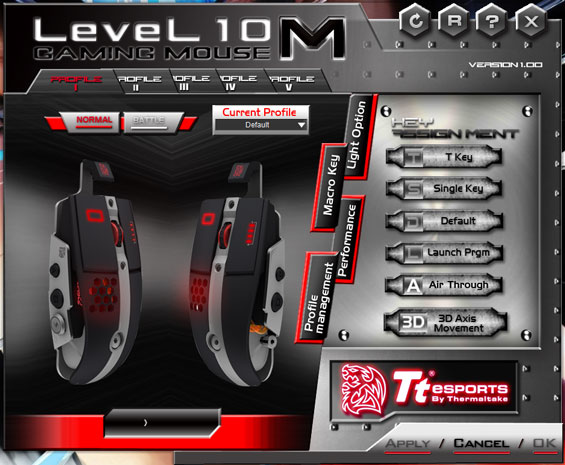
It pains me to say it because I do like Thermaltake, but this software is really unpleasant to use. It works fine, but you can tell from the screen cap above that Thermaltake's engineers went for style first and usability a very distant second. Clicking "Air Through" or "3D Axis Movement" just opens video files with generic electric guitar music that describe the mouse itself. Yet the other "Key Assignment" buttons are blanked out until you click on the button you want to program on the mouse images. "T Key," by the way, means macro.
If you mess around with the software long enough, you can begin to figure out how to use it, but the learning curve need not be so steep. The "Normal" and "Battle" LED mode toggles are just silly and needlessly clutter both the mouse's functionality and the software's interface. What's bizarre is that none of the mouse buttons can be configured to handle media playback or switch between profiles. The former is mostly forgivable, but the latter is mystifying for a mouse that supports both configurable lighting and five different profiles. Most of the functionality you're looking for is here, though. You can individually set the DPI settings for the four levels, configure sensitivity on the X and Y axes individually, control scroll speed, click speed, and so on
The Thermaltake Level 10 M in Practice
When I mentioned in the introduction that mouse comfort is a tricky thing, I very much meant it. Back when I reviewed the Logitech G600 MMO gaming mouse, I pointed out that while the mouse was too big for my dainty little hands, it would undoubtedly find fans elsewhere. I was right, too; a good friend of mine absolutely adores it, and another friend elected to pick one up after trying it out. So it's painfully clear that comfort is a very subjective thing
With that said, I found the Level 10 M to be frankly unpleasant to use. Being able to adjust the height and rotation of the palm rest should alleviate some of the usability problems, but in practice I found myself having a couple of major issues with it
The first issue is where Thermaltake's engineers placed the actuation points under the primary mouse buttons. When I use any mouse, I tend to use not my fingertips but the joint to click the buttons. On the Logitech and Corsair mice I've tested, this hasn't been an issue. Yet the Level 10 M is the first mouse I've used where I've had a real problem consistently clicking due to how I grip the mouse. The bottoms of the mouse buttons are slightly raised, and they're hinged to depress at the middle and top of the buttons. I may be a completely bizarre user, but I found this very uncomfortable
.jpg)
The second issue is the placement of the side buttons. While the ones on the left side are easy enough to press with my thumb, the ones on the right side have too much resistance to reliably click them with my pinky. You have to push them in dead center for them to actuate; pushing them from any angle means they just stay in place. Southpaws will undoubtedly have the same problem if they switch the mouse orientation
And then you get into missing features. On-the-fly DPI switching is grand, but the "DPI shift" functionality of some of Logitech's gaming mice and both of Corsair's is desperately missed. My G500 doesn't have it and I live without because the thing was designed before the concept even existed, but it's here now, and its absence in a brand new premium product is notable. Any game involving some kind of zoom or sniper scope (ranged weapons in MechWarrior Online like the ER PPC or Gauss Rifle, sniper rifles in Far Cry 3) benefits from that functionality
Ultimately I just found the Level 10 M to be overengineered and awkward to grip. I use the Logitech G500 on my home machine and the Corsair M60 when I'm away, and they both fit me almost perfectly from the word go
